
A mortgage calculator can give you a correct monthly payment and still leave you with the wrong impression.
The payment is only one part of the decision. A lower payment may come with a longer term and substantially more interest. A higher payment may shorten the loan. A small recurring extra payment may change the payoff date. A bi-weekly schedule may look attractive, but only if you understand exactly what the model assumes.
That is why we built the free MonkeyTactics Loan & Mortgage Calculator around comparison rather than a single answer. It can place up to five fixed-rate mortgage scenarios side by side, generate a complete amortization schedule for each one, and do the calculation locally with a Rust engine compiled to WebAssembly.
The goal is not to predict every charge on a future loan. It is to make the tradeoffs between principal, interest, payment frequency, extra payments, and time easier to see.
What makes this mortgage calculator different?
A full amortization schedule, extra-payment modeling, and principal-versus-interest charts are useful, but they are not unique by themselves. The difference is how this calculator combines them:
- Compare up to five fixed-rate plans in the same workspace.
- Carry every plan through the summaries, charts, reports, and amortization tables.
- Calculate locally with a Rust/WebAssembly engine instead of a calculation API.
- Use the tool without an account, lead form, cookies, analytics, or server-side calculation storage.
- Export annual or payment-level results as PDF, CSV, or TXT.
- Reopen or share one selected plan with an optional parameterized link.
The result is closer to a mortgage decision workspace than a monthly-payment widget. Some mainstream tools offer broader estimates that incorporate property taxes, insurance, mortgage insurance, or HOA dues. MonkeyTactics has a narrower purpose: compare the long-term principal-and-interest mathematics of several fixed-rate strategies in detail.
A mortgage is a long story, not one payment
The familiar fixed-rate payment formula compresses years of cash flow into one number. That number matters, but it does not tell you:
- how much interest you will pay over the modeled term;
- how quickly your balance falls;
- when principal becomes the larger part of each payment;
- how an extra payment changes the payoff timeline; or
- whether a shorter term is worth the higher required payment.
Our calculator starts with the payment, then follows the loan through every scheduled period. The summary reports the payment per period, total interest, total amount paid, payoff time, and interest share. The charts show the remaining balance, the changing mix of interest and principal, total interest by scenario, and payoff-time differences.
The full amortization table goes one level deeper. Every row shows the payment, principal component, interest component, and remaining balance. You can switch between an annual summary and every individual payment, then print the report or download the schedule as CSV or TXT.
In other words, the calculator does not stop at “Can I make this payment?” It helps you ask, “What does this payment do over time?”
Do lenders hide the true interest cost?
“Hide” is probably too strong. For many U.S. mortgages, standardized disclosures include several measures intended to communicate the long-term cost of borrowing:
- Finance Charge: the dollar amount the loan will cost in interest and loan charges;
- Total of Payments: what the borrower will have paid after making all scheduled payments;
- Annual Percentage Rate: the loan’s cost expressed as an annual rate; and
- Total Interest Percentage: scheduled lifetime interest as a percentage of the amount borrowed.
The Consumer Financial Protection Bureau explains that Total Interest Percentage appears on page 3 of the Loan Estimate and page 5 of the Closing Disclosure. The lifetime cost is disclosed, but it may not be experienced as clearly as the monthly payment.
Monthly payment naturally receives attention because it determines whether a loan fits the immediate household budget. Optimizing only for a lower payment, however, can obscure the cost of extending repayment. A longer term may reduce the required payment while increasing both the interest paid and the time the balance remains outstanding.
That is the gap this calculator addresses. It puts payment, total interest, payoff time, and amortization beside one another, then lets you change an assumption and see all four react. It does not claim that every lender conceals interest. It makes the long-term cost harder to overlook.
Why five scenarios change the conversation
Most mortgage decisions are comparisons disguised as questions.
“What will my payment be?” often really means:
- What happens if the rate is half a point higher?
- How does a 15-year loan compare with a 30-year loan?
- What if I add $200 to every payment?
- How does monthly compare with bi-weekly in this model?
- Which plan costs less interest, and what payment does that require?
The calculator lets you save the current inputs, change one or more assumptions, and add up to five plans to the same comparison. It also provides presets for a rate increase, a 15-year term, an extra $200 per payment, and bi-weekly payments.
Each saved plan appears in the comparison table with its payment, total interest, payoff time, and differences from Scenario A. The same scenarios flow through the balance, interest, payoff, payment-composition, report, and amortization views. You can inspect a plan without losing the others.
That shared view is important because there is rarely one universally “best” mortgage. A shorter term may minimize interest but create a payment that leaves too little room in the household budget. An extra-payment plan may offer flexibility that a larger required payment does not. The calculator exposes those tradeoffs; it does not pretend to choose for you.
A five-scenario comparison with real results
Consider a $300,000 fixed-rate loan at 6.5% over 30 years. Starting with that baseline, we changed one assumption at a time and ran all five plans through the calculator’s production WebAssembly engine:
| Scenario | Modeled change | Payment per period | Total interest | Payoff |
|---|---|---|---|---|
| A | Baseline: 6.5%, 30 years, monthly | $1,896.20 | $382,633 | 30 years |
| B | Rate increased to 7% | $1,995.91 | $418,527 | 30 years |
| C | Term shortened to 15 years | $2,613.32 | $170,398 | 15 years |
| D | Extra $200 each month | $2,096.20 | $279,185 | 23 years, 1 month |
| E | 26 bi-weekly periods per year | $874.76 | $382,312 | 30 years |
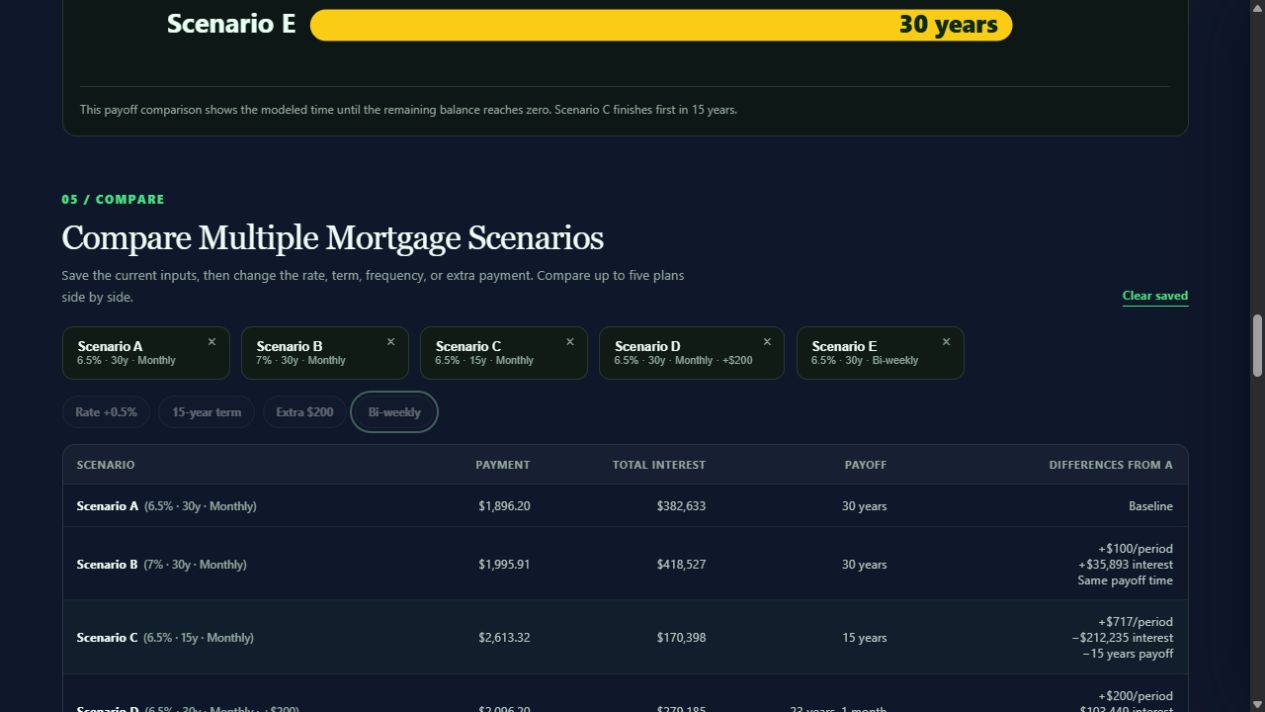
The comparison keeps the baseline visible while showing the cost of changing the rate, term, payment amount, or frequency.
The table exposes several tradeoffs that one monthly-payment result cannot:
- Raising the rate by half a percentage point adds about $100 to the monthly payment and approximately $35,893 in modeled lifetime interest.
- The 15-year plan saves about $212,235 in interest, but its required monthly payment is approximately $717 higher.
- Adding $200 per month saves about $103,449 in interest and reaches payoff 6 years and 11 months sooner in this model.
- The bi-weekly result is a payment every two weeks, so its $874.76 figure must not be compared directly with a monthly payment. In this model it uses 26 equal periods per year; it is not the common “half the monthly payment every two weeks” shortcut that creates an additional full monthly payment each year.
This is a sensitivity test, not a forecast of the offer a lender will make. The most affordable required payment and the lowest lifetime interest are not the same plan. Once one or two scenarios look realistic, the charts reveal how their balances diverge over time.
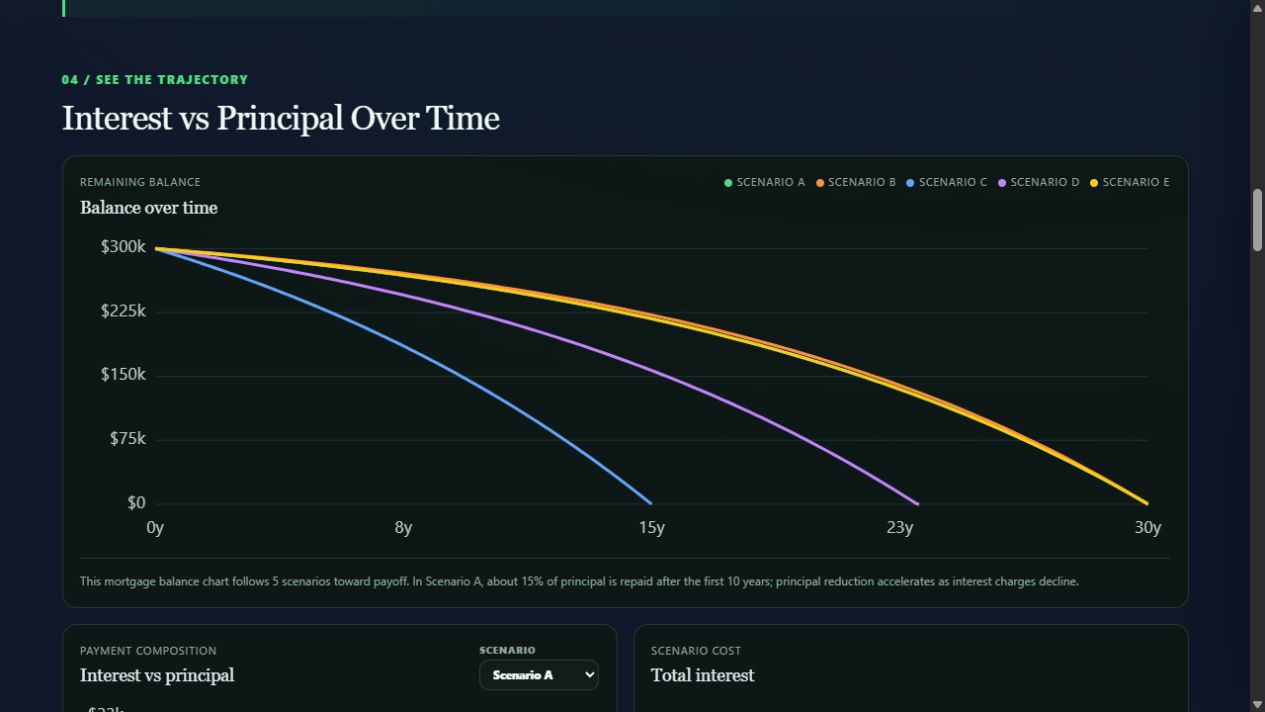
Scenario C reaches zero in 15 years, while the voluntary extra-payment plan follows a middle path and finishes after about 23 years.
What the Rust/WebAssembly engine actually does
The interface collects five inputs for each plan:
- loan amount;
- annual fixed interest rate;
- term in years;
- monthly or bi-weekly payment frequency; and
- optional extra amount per payment period.
Those values are passed directly to a Rust module compiled to WebAssembly. The engine validates the inputs, applies the standard fixed-rate amortization formula, and walks the balance forward one period at a time. For each period it calculates the interest due, the amount applied to principal, the actual payment, and the remaining balance. It stops when the modeled balance is paid off and returns the schedule to the browser for the tables, narrative, exports, and charts.
The engine also handles zero-interest loans, prevents an oversized final principal payment, supports both 12 monthly and 26 bi-weekly periods per year, and limits multi-scenario calculations to five plans. Automated tests cover the fixed-rate schedule, zero-interest behavior, bi-weekly frequency, extra-payment savings, multi-scenario output, and invalid inputs.
Rust and WebAssembly do not make financial arithmetic magically exact. The engine uses 64-bit floating-point arithmetic and rounds displayed monetary results to cents. The advantage is a small, typed, testable calculation core with one defined path for every scenario—not a vague claim that JavaScript is incapable of doing mortgage math.
That distinction matters. The value of the architecture is consistency, validation, reuse, and transparency.
Privacy by design means the server is not part of the calculation
Mortgage inputs can reveal more than people realize. A loan amount, likely interest rate, term, and intended extra payment can sketch part of a household’s financial position.
The calculator does not need those values on a MonkeyTactics application server. The page and its WebAssembly module load in the browser, and the calculations run there. The mortgage engine makes no external calls. No account is required, and the tool does not use cookies, analytics, or server-side storage for the calculation.
That is a narrower and more useful privacy statement than “we take privacy seriously.” Visiting the website still requires the browser to request the page and its assets. The specific protection is that the mortgage inputs do not have to be submitted to a calculation API or saved in a user profile.
The page URL can contain scenario parameters so a plan can be reopened or shared. The calculator updates that URL locally, and the Copy scenario link action only writes it to the clipboard when you select the button. Because the numbers are visible in the link, treat a copied scenario URL as financial information: share it only with people you intend to see it, and remember that browsers and messaging services may retain URL history.
Monthly and bi-weekly are explicit models
“Bi-weekly” can mean different things in real lender programs. In this calculator, it means 26 equal payment periods per year, with interest accrued for each of those periods. That definition is visible in the tool because a comparison is only useful when its assumptions are clear.
A lender or servicer may collect, hold, combine, or apply partial payments differently. Some loans may also have prepayment restrictions or special processing rules. Before acting on an extra-payment or bi-weekly result, confirm how the actual lender applies the money to principal.
The same caution applies to the payment total. The calculator models principal and interest for a fixed-rate loan. It does not include property taxes, homeowners insurance, mortgage insurance, HOA dues, escrow changes, closing costs, lender fees, adjustable-rate changes, or other expenses that may affect the real monthly housing cost.
Those omissions are not hidden in fine print. They define what the model is—and what it is not.
Extra payments deserve a full schedule
An extra principal payment reduces the balance used to calculate future interest. That effect compounds through the remaining schedule, so the meaningful result is not just the amount of the next payment. It is the interest avoided and time removed from the modeled loan.
When you enter an extra amount, the calculator creates a no-extra-payment baseline for the same loan. It then reports the estimated interest savings and the approximate time saved. The comparison chart and amortization schedule show where the two paths diverge.
This is especially useful when comparing flexibility. A shorter contractual term and a longer term with voluntary extra payments may produce different required payments even when you plan to pay similar amounts. The calculator can show the mathematical paths, while you evaluate the budget, discipline, lender rules, and risk behind them.
Exports turn an estimate into something you can inspect
Useful financial tools should let you take the result with you.
The calculator can:
- print a formatted mortgage scenario report;
- open the browser’s print workflow for saving as PDF;
- download annual or payment-by-payment schedules as CSV;
- download the schedule as plain text; and
- create a parameterized link to the selected scenario.
Those formats serve different jobs. A printed or PDF report is convenient for discussing a plan. CSV is better for checking the schedule in a spreadsheet or adding your own columns. TXT is a simple portable record. The scenario link is the quickest way to reopen the same inputs.
All of these outputs are created from the result already in the browser.
What the calculator can answer—and what it cannot
Designed for: comparing fixed-rate principal-and-interest strategies.
Not designed for: estimating taxes, insurance, mortgage insurance, HOA dues, qualification, affordability, or live lender rates.
The tool is designed to answer mathematical questions about a modeled fixed-rate loan:
- What is the scheduled principal-and-interest payment?
- How much interest accumulates under these assumptions?
- How does the principal balance change over time?
- How might extra payments affect interest and payoff time?
- How do as many as five modeled plans compare?
It cannot tell you which loan you will qualify for, quote a live rate, estimate every ownership cost, interpret a contract, or decide how much house is prudent for your situation. Its results are estimates, not lending offers or financial advice.
That boundary is intentional. A trustworthy calculator should make its assumptions inspectable instead of dressing an estimate up as certainty.
Run the decision, not just the payment
The most useful mortgage question is rarely “What is the number?” It is “How does the number change when the plan changes?”
Try the MonkeyTactics Loan & Mortgage Calculator, save a baseline, and change one assumption at a time. Compare the payment you would owe, the interest you would pay, and the time you would remain in debt. Then inspect the schedule behind the summary.
Five scenarios, a full loan story, and no calculation server in the middle—that is the mortgage calculator we wanted to use ourselves.