
Why this matters
Most crossword solvers are built around one of two ideas. Some search a large archive of clue-and-answer pairs from previously published puzzles. Others take the letters you already know and return dictionary words that fit the pattern.
Both approaches are useful. They also leave a gap.
What happens when the exact clue is not in an archive, the answer is a phrase rather than a single word, or several candidates fit the crossing letters? And what if you want to keep two plausible answers alive until another part of the grid settles the question?
That gap is why we built the free MonkeyTactics Crossword Solver. It combines clue meaning, WordNet relationships, crossing-letter patterns, answer length, dictionary membership, and source quality. It then explains why each candidate ranked where it did and lets you organize possibilities by their positions in the grid.
MonkeyTactics is built for meaning, uncertainty, and workflow—not just retrieving an answer. This article explains how that changes the solving experience.
The main kinds of online crossword solver
Takeaway: archive search, pattern matching, and semantic search solve related but different problems.
The best-known tools do not all solve the same problem.
Crossword Tracker centers its experience on a database of clues that have appeared in popular puzzles. That historical record is valuable when a constructor reuses a familiar clue or when you want to see other clues associated with an answer.
Crossword-Solver.io also emphasizes published clues and current puzzles. Its large archive is particularly useful when you suspect that the exact clue has appeared before.
OneAcross takes a more sophisticated approach than a simple archive search. It combines suggestions from multiple sources and reweights them according to past accuracy, alongside the clue and known-letter pattern.
The Crossword Solver offers quick pattern matching, a clue database, a solution wizard, forums, and related word tools.
These are substantial services, and their archives can be a real advantage for current-event references, proper names, crosswordese, and clues copied verbatim from past publications. MonkeyTactics makes a different tradeoff: it is designed to reason locally over public lexical data and to help you manage candidates without depending primarily on a catalog of yesterday’s answers.
Feature comparison at a glance
This table compares the services’ publicly described interfaces and methods as checked on September 2, 2026. “Not prominently described” is not a claim that a service lacks an internal capability; it means the feature is not presented as part of its main public workflow.
| Capability | MonkeyTactics | Crossword Tracker | OneAcross | Crossword-Solver.io |
|---|---|---|---|---|
| Primary emphasis | WordNet meaning plus pattern constraints | Historical clue-answer relationships | Multi-source, probability-weighted suggestions | Published clue and daily-puzzle archive |
| Known-letter pattern | Yes | Yes | Yes | Yes |
| Publicly described semantic method | WordNet synsets and graph relationships | Keyword and historical clue matching | Language analysis and multi-source weighting | Not prominently described |
| Per-result score explanation | Visible signal breakdown | Not prominently described | Methodology described globally | Not prominently described |
| Multi-word handling | First-class, with grid-cell counting | Archive dependent | Search dependent | Spaces omitted for length entry |
| Candidate workflow | Grouped Pick List, notes, export/import | Clue and answer relationship pages | Search results | Saved account features may vary |
| Main clue search processed locally | Yes | No such claim on the public help page | No such claim on the public search page | No such claim on the public search page |
| Downloadable offline solver | Yes, including clue data, word lists, and local definitions | Not prominently described | Not prominently described | Not prominently described |
The point is not that one design wins every clue. Archive tools are often ideal for exact published clues; MonkeyTactics is unusual because it combines semantic retrieval with a private, reusable candidate workflow.
The difference starts with meaning
Takeaway: MonkeyTactics uses WordNet to find semantically related answers even when the clue wording differs.
A plain keyword search asks whether the words in your clue also appear in a stored clue or definition. The MonkeyTactics solver goes further by using a locally indexed dataset derived from Princeton WordNet 3.0.
WordNet organizes English words into sets of related meanings. Those meanings are connected through relationships such as synonyms, broader categories, narrower categories, and similar concepts. The solver uses that structure to retrieve candidates that may be semantically right even when the wording is not identical.
Suppose a clue and a dictionary definition describe the same idea with different vocabulary. A literal text match may miss the connection. WordNet can provide a path between them.
The search considers several signals:
- direct overlap with the clue;
- words from the same WordNet meaning group;
- related concepts in the WordNet graph;
- recognized clue phrases;
- an exact clue-phrase match;
- known letters in the answer pattern;
- exact answer length;
- dictionary membership; and
- the quality of the underlying record.
That does not turn every vague clue into a certainty. It does make the search less brittle than looking only for the exact words a constructor used.
The ranking is visible instead of mysterious
Takeaway: every candidate can show which signals lifted it—meaning, synset, graph relationship, pattern, length, dictionary membership, or source quality.
Many answer sites put one result at the top without showing what made it “best.” That can encourage false confidence, especially when the clue is broad.
Select a MonkeyTactics result and its definition window shows an explainable match-strength breakdown. You can see whether the answer earned its position through direct clue meaning, a same-synset relationship, a WordNet graph connection, a clue-phrase concept, pattern letters, length, or source quality.
This matters because two candidates can reach the top for very different reasons. One might match the clue closely but have weak support from the crossings. Another might fit every known letter while having only a related meaning. The breakdown tells you which kind of evidence you are looking at.
The displayed strength is a ranking score, not a probability. A top result is the strongest candidate in the current filtered set, not a promise that the answer is correct. Tense, plurality, abbreviations, puzzle theme, and crossing answers still matter.
Local definitions make privacy part of the architecture
Takeaway: clue search, candidate management, and most definition lookups stay local; Datamuse is only a last-resort online fallback.
The clue index is divided into compressed pieces and loaded only when needed. Clue matching, pattern filtering, ranking, and Pick List storage happen in the browser. Your clue, crossings, filters, grid positions, and notes are not sent to a crossword-search backend.
Share links contain only the answer, clue, pattern, and dictionary choice. They do not include your complete Pick List or private notes.
Opening a candidate does not automatically mean an API request. The solver first uses the definition attached to the matched clue record, then checks its dedicated local WordNet definition index. It can also recover a useful local base-form definition for plurals, verb forms, and superlatives without changing the selected crossword answer. For example, a plural candidate can display its singular lemma’s definition while remaining the plural answer in the Pick List.
If no suitable local definition exists, the solver checks its page-session Datamuse cache and only then makes a Datamuse request for that word. This is a more precise promise than saying the page is simply “private”: the solving pipeline is local, while an online definition fallback may make a narrowly scoped request. Offline Mode disables that fallback completely.
Download the complete solver for offline use
Takeaway: one optional download makes clue search, pattern matching, ranking, Pick Lists, and available definitions work without an internet connection.
Select Enable Offline Mode below the dictionary choices to store the complete solver in the current browser. The download includes the application files, all three dictionary options, the WordNet-derived clue index, semantic-ranking data, and the local WordNet definition shards.
While Offline Mode is enabled, Datamuse and external dictionary links are disabled. Clues, patterns, filtering, ranking, definitions available in the local index, and Pick List workflows continue without a connection. Related web guides are also hidden because following them would require the network.
The download is versioned and verified before the tool reports that it is ready. Re-enabling Offline Mode reuses files already stored by the browser and downloads only missing or updated assets. Turning the mode off restores online fallbacks but retains the downloaded files for fast re-enabling. Browser storage controls can still remove the data, and the tool will report when another download is required.
Clue search and pattern search work together—or separately
Takeaway: meaning produces plausible concepts, the pattern produces structurally valid words, and their intersection produces a more useful ranking.
Crossword solving rarely moves in a straight line. Sometimes you have the clue but no letters. Sometimes the clue is opaque but four crossings are certain. Sometimes you only know the beginning of a long themed answer.
The solver supports all three situations:
- Clue only: enter a straight-definition clue and optionally set the answer length.
- Pattern only: leave the clue blank and enter known letters with
?for each unknown cell. - Clue plus pattern: use meaning and crossings together to narrow and rank the results.
The pattern language also has a useful wrinkle. ? represents exactly one unknown letter, while * represents any number of letters. A pattern such as C?A?E describes a five-cell answer. ?P* says that the second letter is P, but the total length is not yet certain.
Dots, underscores, and hyphens are normalized into single-cell blanks, so you do not have to rewrite a pattern copied from another interface.
Known pattern letters are highlighted inside each result. That small visual choice makes a long list easier to scan because the confirmed crossings stay visible.
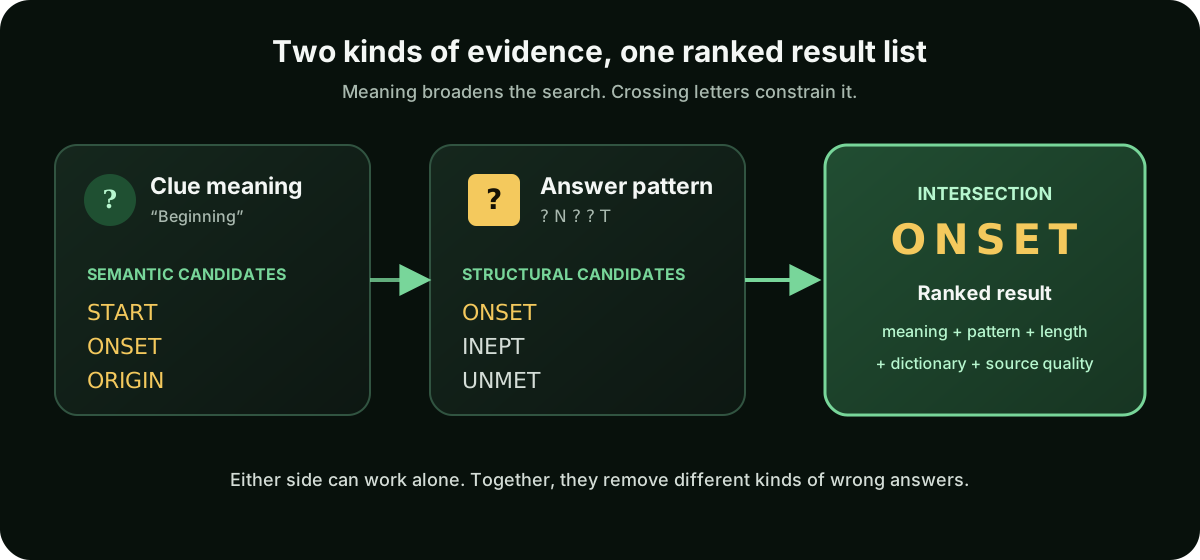
Clue meaning and grid structure eliminate different kinds of wrong answers. Either can work alone; together they are much more selective.
Multi-word answers are first-class results
Takeaway: phrases stay readable while their spaces are correctly ignored when counting crossword cells.
Many crossword answers are phrases, names, or expressions whose spaces disappear when entered into the grid. Treating these as an afterthought can produce confusing result lists and incorrect length counts.
The MonkeyTactics clue index contains more than 129,000 filtered WordNet-derived records, including over 34,000 multi-word answers. Spaces remain visible in the result for readability, but patterns and answer length count only grid letters.
That means a phrase behaves the way a crossword entry should: legible as language, compact as fill.
This is especially useful before you have all the crossings. A phrase can be hard to imagine from a solid block of letters, even when its definition is familiar.
The Pick List is built for an actual puzzle
Takeaway: the Pick List preserves competing answers by grid position so you can postpone a decision without losing your reasoning.
The most unusual part of the solver may not be the search engine at all. It is the Pick List.
A typical solver returns an answer list and leaves the rest to you. But a partially completed grid often contains several uncertain entries at the same time. You may have two candidates for 14-Across, three for 21-Down, and a crossing letter that will eventually decide both.
The Pick List lets you save a candidate with its full solving context:
- answer and original clue;
- letter pattern and matched definition;
- match strength and score details;
- selected dictionary;
- grid position;
- private notes; and
- timestamp.
Give alternatives the same grid position—such as 14A or 21D—and the solver groups them together in a collapsible section. Once you use a position, it becomes a suggestion for later picks, so you can keep naming consistent without retyping it.
This turns the tool into a lightweight hypothesis board. You do not have to choose too early, open many tabs, or paste disconnected words into a notes app.
A real ambiguity: START or ONSET?
Suppose 14-Across has the clue “Beginning” and five empty cells. A clue-only search may make both START and ONSET look plausible. Save both candidates, assign each one to 14A, and add any useful note about the surrounding theme.
Later, a crossing gives you ?N???. Select Insert on either saved candidate, update the pattern, and rerun the search. The solver restores the original clue, inferred length, and dictionary; the new N sharply favors ONSET without making you reconstruct the earlier search.
When new crossing letters arrive, select Insert on a saved candidate. The solver restores the clue, pattern, inferred length, and dictionary, then reruns the search. The candidate is not a dead bookmark; it is a reproducible search state.
For crossword constructors: semantic search can also help when testing alternate fill for a theme entry. Search the intended concept without a pattern, then add fixed crossing letters to see which synonyms or related phrases survive. It is not a substitute for a construction database or a fill-quality review, but it can expose options that literal keyword search misses.
You can export the whole solving trail
Takeaway: versioned export and validated import make a difficult puzzle’s candidate history portable.
The Pick List lives in browser storage, but it is not trapped there.
Export creates a versioned JSON file containing saved candidates, their clues and patterns, semantic scores, grid positions, and notes. You can later import the file into the same browser or move it to another device.
Import offers two deliberate modes:
- Merge adds new candidates while skipping duplicates.
- Replace overwrites the current Pick List after confirmation.
Imported data is validated before it is saved. This is a niche feature, but a genuinely useful one for long, difficult, collaborative, or research-heavy puzzles. It also gives you a portable record of how you worked through the grid rather than only the finished answers.
Sharing preserves context, not just the answer
Takeaway: links, formatted summaries, and QR codes carry the evidence needed to evaluate a suggestion.
Copying a candidate word into a message often creates another round of questions: Which clue was that? What pattern did it fit? Why did it seem plausible?
Every saved pick can generate a compact share link, a formatted clipboard summary, and a QR code. The shared context includes the answer, clue, pattern, matched definition, ranking details, dictionary, timestamp, and a direct link back to the solver.
Opening the link restores the clue and pattern, infers the answer length, selects the dictionary, reruns the search, and adds the shared candidate to the recipient’s local Pick List. A phone can scan the QR code and continue the same investigation without manually re-entering the clue.
This is unusually complete for a clue solver. It treats a suggested answer as an explainable, reproducible piece of puzzle state rather than a naked word.
Standard, Expanded, or Both
Takeaway: choose focused ENABLE results, broad Wiktionary-derived coverage, or the 867,177-entry union of both lists.
Pattern results can use three live choices:
- Standard contains 172,820 entries from the public-domain ENABLE list.
- Expanded contains 854,775 normalized entries derived from Wiktionary.
- Both, the Crossword Solver default, searches 867,177 unique entries after overlap is removed.
Expanded and Both are useful when a puzzle leans on regional, historical, uncommon, or specialist vocabulary. Dictionary membership and crossword correctness are not identical: a themed entry, proper name, abbreviation, or piece of contemporary slang may still be valid fill without appearing in either list.
Additional filters can enforce an exact length, starting letters, ending letters, required letters, excluded letters, or an optional pool of available letters. The letter pool is intentionally separate from the normal crossword workflow: use it only for a puzzle that limits which letters may be used.
What MonkeyTactics deliberately does not try to be
Takeaway: this is a straight-clue research tool, not a cryptic parser, daily-answer archive, or automatic full-grid solver.
The solver works best on straight definition clues. It does not parse cryptic wordplay, prove anagrams, identify hidden answers, or explain container-and-contents constructions. A cryptic-specific tool is a better choice for that job.
It also does not maintain a publication-by-publication archive of today’s answers. Archive-led competitors will often be stronger for an exact clue from a major daily puzzle, especially when the answer is a celebrity, place, brand, current event, or piece of conventional crosswordese that WordNet does not cover well.
And it does not solve an entire interlocking grid automatically. The Grid Position field organizes your candidates, but there is no visual grid that propagates every crossing letter.
Those limitations follow from the product’s focus. MonkeyTactics is for clue-level semantic search, flexible letter constraints, transparent evidence, and careful candidate management. It complements an archive search rather than pretending archives have no value.
A practical workflow
Takeaway: keep several hypotheses alive, then let new crossings—not an early guess—settle the answer.
Here is a simple way to use the features together:
- Enter the clue exactly as printed and set the known answer length.
- Add crossing letters with
?in every unknown cell. - If you expect an unreliable connection, enable Offline Mode while you are online.
- Open the top candidates and compare their definitions and match-strength breakdowns.
- Save plausible alternatives to the Pick List and label them with the grid position.
- Add a note when tense, theme, abbreviation, or another crossing makes a candidate more or less likely.
- Continue elsewhere in the puzzle.
- When a new crossing arrives, update the pattern or use Insert to restore the saved search.
- Export the Pick List if the puzzle will continue on another browser or device.
- Share one candidate by link or QR code when another solver needs the full context.
The key habit is to preserve uncertainty rather than forcing the first plausible answer into the grid. Crosswords are networks of constraints. A useful solver should help you manage those constraints, not hide them behind one confident-looking result.
The same principle appears in our guides to Wordle strategy, shared-guess Quordle solving, and the mathematics of solving 4, 8, and 16 Wordles at once: good word-game tools should make constraints visible and help the player decide what to test next.
A solver that helps you think
Takeaway: the goal is not to fill a box for you; it is to help you resolve ambiguity with evidence.
The defining difference is not any single feature. It is how the pieces work together.
WordNet relationships broaden the search beyond exact wording. Letter patterns and length bring it back to the physical grid. Explainable scores show why an answer surfaced. Multi-word support keeps phrases readable. The Pick List groups competing hypotheses by grid position. Export, import, deep links, and QR codes let that context survive across sessions and people. Local definitions reduce external requests, and Offline Mode keeps the complete solving workflow available without a connection.
That combination makes the MonkeyTactics tool less like a page of past answers and more like a private crossword research desk.
What this means for solvers
You can keep START and ONSET alive until the grid provides real evidence. You can understand whether a suggestion comes from the clue’s literal wording, a related meaning, or the crossing pattern. You can hand a collaborator the clue and reasoning instead of sending an unexplained word. And you can do the core work without uploading your puzzle notes to a search service.
In short, the solver helps you manage ambiguity, preserve uncertainty, collaborate with context, and keep your working state private. It is designed to help people think—not merely fill boxes.
Try it with a real clue
Open the solver and enter:
- Clue:
Beginning - Pattern:
?????
Compare START and ONSET, open their match explanations, and save both to 14A. Then change the pattern to ?N??? and watch how one crossing letter changes the evidence.
Try the MonkeyTactics Crossword Solver →
Princeton WordNet is used under its applicable license. MonkeyTactics is an independent utility and is not affiliated with the crossword publications or competing services mentioned above.