
A camera watches a road. A QR code sits on a menu, poster, package, or event badge.
They look like completely different technologies. One is visibly built to observe. The other looks like a convenient square that opens a link.
But a dynamic QR code and a Flock Safety license-plate camera share a revealing architectural pattern: each turns a brief encounter in the physical world into a timestamped record in a provider’s cloud.
The comparison is not that a marketing redirect has police powers, or that every dynamic QR provider is secretly operating a law-enforcement database. The stakes and capabilities are plainly different. The parallel is in the data model:
Observe an event, attach time and location context, store it centrally, and make the history searchable.
There is another similarity that should bother businesses even more. The person being measured may never receive a meaningful choice before the first record is created.
When a driver passes a plate reader, the camera does not stop the car to ask permission. When a scanner opens a dynamic QR link, the redirect server must receive that request before it can send the visitor to the promised destination. Any notice on the destination page arrives later.
That missing consent moment is the strongest reason to question whether scan-level analytics belong in an ordinary QR campaign at all.
TL;DR: A dynamic QR code usually points to a provider-controlled redirect. Opening it exposes a request to that provider before the final page loads, allowing the provider to record the time, IP address, code identifier, and request metadata. Some services add rough location, device classification, cookies, or more advanced fingerprinting. A static QR code contains the direct destination and creates no scan log for the QR generator. Either way, a decoder that reveals the encoded address without automatically opening it gives the person scanning a meaningful chance to inspect the destination and decline.
What dynamic QR codes actually do
A QR image is not dynamic by itself. The black-and-white pattern printed on a sign cannot change after it leaves the printer.
What changes is the destination stored behind it.
Instead of encoding the business’s final URL, a dynamic code encodes a short URL controlled by a QR platform. The platform keeps a database record connecting that short URL to the current destination. The business can edit the record later without reprinting the QR image.
That is useful. It is also what places the QR provider between the scanner and the destination.
Server redirects
The path normally looks like this:
- A phone reads the provider’s short URL from the QR code.
- If the user opens it—or the scanner opens it automatically—the phone requests that URL from the provider.
- The provider looks up the current destination.
- The provider replies with an HTTP redirect.
- The browser requests the final page.
HTTP redirects are immediate by design: the browser receives a 3xx response containing a Location header and loads the new address. MDN’s explanation of HTTP redirection describes that basic exchange.
The first request is not an optional analytics script that loads after the destination. It is the mechanism required to discover the destination.
Scan logging
Because the provider receives the first request, it can record facts such as:
- The unique dynamic-code identifier
- The request timestamp
- The source IP address
- The user-agent and other request headers
- Whether the request completed and where it was redirected
- A campaign, location, or placement label assigned by the business
The service may count this as a “scan,” although it is more precisely a request to the redirect URL. Bots, link previews, security scanners, repeated opens, and scanner-app behavior can complicate the count.
Device fingerprinting
Request headers can often support a broad device classification: mobile or desktop, browser family, operating system, and sometimes version information. The standard User-Agent header exists to identify characteristics of the requesting application, though browsers increasingly reduce the detail it exposes. MDN documents the request headers that can accompany an HTTP request.
That is not automatically the same as a durable device fingerprint.
A more distinctive fingerprint may combine the IP address and headers with cookies, browser storage, TLS characteristics, screen properties, installed fonts, or JavaScript-accessible features. Whether a particular dynamic QR service does this depends on its implementation and privacy policy. Businesses should not assume that “device type” means full fingerprinting—but they should not assume the opposite without checking.
Geolocation inference
An IP address can usually be mapped to an approximate region. The result may identify a country, state, metro area, or network; it is not the same as the phone’s precise GPS position and can be wrong because of mobile routing, corporate networks, VPNs, and privacy relays.
Precise location normally requires another source, such as location permission in an app or browser, campaign knowledge about where a particular physical code was placed, or data joined from elsewhere.
That last method is easy to overlook. If a restaurant creates a different dynamic code for every table, or a retailer creates one for every store display, the code identifier itself reveals a location even when the phone shares no GPS coordinates.
The consent problem happens before the landing page
On an ordinary website, a visitor may see a privacy notice, a cookie banner, or analytics controls before nonessential browser storage is used. The implementation is not always good and the law varies by jurisdiction, but at least the interface has somewhere to present a choice.
A dynamic redirect reverses the order:
Request first. Notice later.
By the time the final page can show “Accept” or “Reject,” the redirect provider has already received the network request required to forward the visitor. Rejecting cookies on the destination cannot make that first request disappear.
This does not mean a scan bypasses the browser or every privacy protection. Many camera apps preview a URL and wait for the user to tap it. The resulting link may open in the normal browser, where VPNs, privacy relays, extensions, and browser protections can still matter. A cautious user can also decline to open the preview.
The narrower—and more defensible—claim is more troubling:
Once the dynamic link is opened, there is no technical way to opt out of contacting the redirect provider, because contacting it is how the browser learns where to go.
Whether logging that unavoidable request is lawful depends on the data, purpose, notices, contracts, users, and jurisdictions involved. Cookie rules also do not cover every kind of server log in the same way. But regulators treat IP addresses, cookies, geolocation, browsing history, and inferences as potentially significant personal information. California’s attorney general, for example, lists browsing history, geolocation, and profile-building in its CCPA explanation, while UK guidance says cross-site tracking and device fingerprinting for nonessential purposes can require consent under PECR.
The practical business question is not merely “Did the landing page have a banner?” It is “What did every company in the redirect chain receive before that banner appeared?”
What Flock cameras actually do
Flock Safety sells automated license-plate reader systems used by law enforcement, communities, and businesses. The company’s own product page says its cameras convert plate images into searchable data that can include vehicle make, model, color, location, and time.
License-plate capture
An automated license-plate reader photographs passing vehicles and uses software to extract a plate number and vehicle characteristics. The encounter becomes structured evidence rather than a frame someone must manually review.
Flock says its products do not perform facial recognition and that law-enforcement access is subject to permissions, audit trails, retention controls, and customer policies. Its LPR product description also advertises vehicle-signature search, real-time alerts, hotlists, and billions of monthly plate reads.
Cross-site vehicle search
A single camera answers a narrow question: what passed this location?
A shared network answers a much larger one: where else did this vehicle appear?
Flock’s description of National Lookup says participating police departments can search a complete, known plate across cameras that other departments have opted into the network. That turns isolated observations into cross-jurisdictional search.
Centralized cloud intelligence
The camera does not merely create a local photograph. It contributes a record to cloud software that can store, filter, alert on, audit, and share the observation according to configured rules.
Flock says its default retention period for license-plate-reader evidence is 30 days, after which the data is hard-deleted from the cloud; contracts, laws, or evidentiary holds can affect retention. The current rule is described in the company’s Flock Evidence Policy.
Law-enforcement workflows
The platform is designed around investigations. Authorized users can search historical observations, receive alerts on hotlisted vehicles, share access, and document reasons for searches. Those controls matter, but they also illustrate the power of making observations centrally searchable.
National network scale
Flock describes its system as the largest fixed license-plate-reader network and says it serves more than 5,000 law-enforcement agencies. Recent reporting has focused on how data can be searched or shared across jurisdictions and on allegations of misuse. In August 2026, Flock announced additional platform controls amid that scrutiny, according to the Associated Press.
That public debate is the context for the analogy—not evidence that the two technologies have identical consequences.
The surveillance parallel
Flock cameras track vehicles. Dynamic QR systems measure devices opening links. One is generally passive: the vehicle is observed while passing. The other usually begins when a person chooses to open a scanned URL.
Even with those differences, the systems rhyme in four ways.
Both create behavioral datasets
A plate read is not just an image. It is a vehicle observed at a time and place.
A dynamic QR request is not just a click. It can become a device or network observed interacting with a campaign at a time and an inferred or campaign-defined place.
The individual event may look insignificant. The dataset becomes valuable because the events accumulate.
Both can track movement across locations
Multiple cameras can reveal that the same plate appeared at multiple places.
Multiple campaign codes can reveal that the same IP address, cookie, account, or fingerprint interacted with different posters, stores, tables, venues, or products. The QR platform may not always be able to prove those events came from one person, especially behind shared networks or privacy tools. But the architecture makes correlation possible.
Both centralize data in a provider’s cloud
Centralization is what makes a network convenient. It is also what expands the blast radius.
A cloud dashboard can make every campaign searchable from one account. It can also create a concentrated target for credential theft, insider misuse, subpoenas, vendor access, unexpected product changes, and breaches.
Both can build profiles over time
One plate read says a vehicle passed one camera. Repeated reads suggest a route or pattern.
One QR request says a code was opened. Repeated events can suggest campaign interest, venue visits, product interactions, time-of-day habits, or a journey from offline advertising to online conversion.
That is why “we only collect analytics” is not a complete privacy answer. The question is what those analytics can become when retained and linked.
Why this matters for businesses
Dynamic QR analytics can be useful. A company may genuinely need editable destinations, fraud controls, regional routing, inventory tracking, or campaign measurement.
But convenience does not erase responsibility.
Compliance
A business that chooses the purpose and means of personal-data processing may have controller obligations even when a vendor operates the infrastructure. Under the GDPR, for example, a controller determines why and how data is processed, while processor duties must be specified in a contract. The European Commission’s controller and processor guidance explains the distinction.
Before deploying a dynamic code, a business should know:
- Exactly what the provider records on the redirect request
- Which fields are necessary and which are optional analytics
- The lawful basis or consent model in each relevant jurisdiction
- Retention and deletion periods
- Whether information is sold, shared, or used for the provider’s own purposes
- Which subprocessors and hosting regions are involved
- How access, export, correction, and deletion requests are handled
- Whether printed codes keep working after cancellation
This is a vendor-governance question, not just a graphic-design choice. Specific legal duties vary, so businesses should obtain appropriate privacy or legal advice for their use case.
Customer trust
A customer scanning a menu or event sign expects the promised page. They may not expect an unrelated QR platform to receive the request first.
That mismatch matters. Trust is damaged not only by dramatic breaches but by small discoveries that make people feel tricked: a hidden short domain, unexplained location analytics, a code that stops working after a subscription lapses, or a privacy policy that never mentions the QR vendor.
Data liability
Every stored field creates work and risk. Someone must secure it, restrict it, respond to lawful requests, honor retention rules, investigate misuse, and explain it after an incident.
If scan-level data is not necessary, collecting it is a poor bargain. The cleanest breach response for a dataset is being able to say it never existed.
Privacy expectations
QR codes feel like offline objects. That visual familiarity lowers people’s guard.
Businesses should not exploit that intuition. If a campaign deliberately measures scans, the disclosure should be understandable at the physical point of interaction—not buried on a page that appears only after the measurement begins.
Why static QR codes avoid the provider-surveillance layer
A static URL QR code contains the final destination itself.
If it encodes https://example.com/menu, a scanner can display that address and the browser can request example.com directly. There is no QR-platform redirect to resolve first.
That gives a static code five important properties.
No QR-provider scan logs
The generator is not contacted when the printed image is scanned. A static image has no radio, script, account, or callback channel.
No QR-provider tracking
With no provider in the scan path, the generator cannot use a redirect request to classify the device, infer a scan location, or correlate interactions across its customers.
No QR-provider surveillance footprint
The generator does not accumulate a scan history because it never receives the scans.
No redirect-cloud dependency
The printed code does not depend on a QR company’s redirect database, subscription status, or future pricing. It continues to point to the address it contains.
No false promise of total anonymity
Static does not mean that opening the destination is invisible.
The destination website still receives an ordinary web request and may log an IP address, use analytics, set cookies, request location, or forward the visitor again. A static QR code removes the QR provider from the chain; it does not neutralize the privacy practices of the site you chose to encode.
That precision is important. “No QR-provider scan tracking” is a strong, testable claim. “No one can track a static QR visit” is false.
How the MonkeyTactics decoder gives the scanner more control
Businesses should prefer static codes when they do not need hosted redirects. But the person standing in front of a QR code usually did not choose how it was created.
They need a way to answer three questions before opening it:
- What does this code actually contain?
- Does the visible address hide one or more redirects?
- Do I want to contact the destination at all?
The MonkeyTactics QR Code & Barcode Decoder is designed around that pause between decoding and navigation.
Decode locally without opening the link
The decoder can read a QR code from:
- An uploaded or dragged image
- A screenshot pasted from the clipboard
- A public image URL
- A live camera, after the user grants camera permission
Uploaded files, pasted screenshots, and camera frames are decoded locally in the browser. The tool uses a Rust/WebAssembly decoder, the browser’s Barcode Detector when available, and a local ZXing/WebAssembly fallback. The source image is not uploaded to MonkeyTactics or stored by the decoder.
Most importantly, finding a web address does not cause the browser to visit it. The tool displays the decoded value first.
That changes the consent sequence from:
Scan → open → discover what happened
to:
Scan → inspect → decide
The user can stop after the second step.
See the literal encoded URL
A QR pattern is not human-readable. A familiar logo, restaurant name, or official-looking sticker says nothing about the address hidden inside it.
The decoder exposes that address as text. A user can check:
- Whether the domain matches the organization they expected
- Whether the code contains a QR-platform short link rather than the promised destination
- Whether the spelling uses a look-alike or misleading domain
- Whether the scheme is ordinary
https://or something unexpected - Whether the QR contains plain text or another payload instead of a web link
This is the first meaningful opt-out point. If the encoded domain looks wrong—or if the user simply does not want to contact a dynamic QR provider—they can close the page without opening the decoded link.
Reveal the redirect chain before visiting
When the decoded content is an HTTP or HTTPS address, the tool sends that address to the MonkeyTactics privacy proxy for resolution. The proxy makes header-only requests and returns the redirect hops, HTTP status codes, timing, and final destination for review. It does not send the QR image, download the destination page body, or navigate the user’s browser to the result.
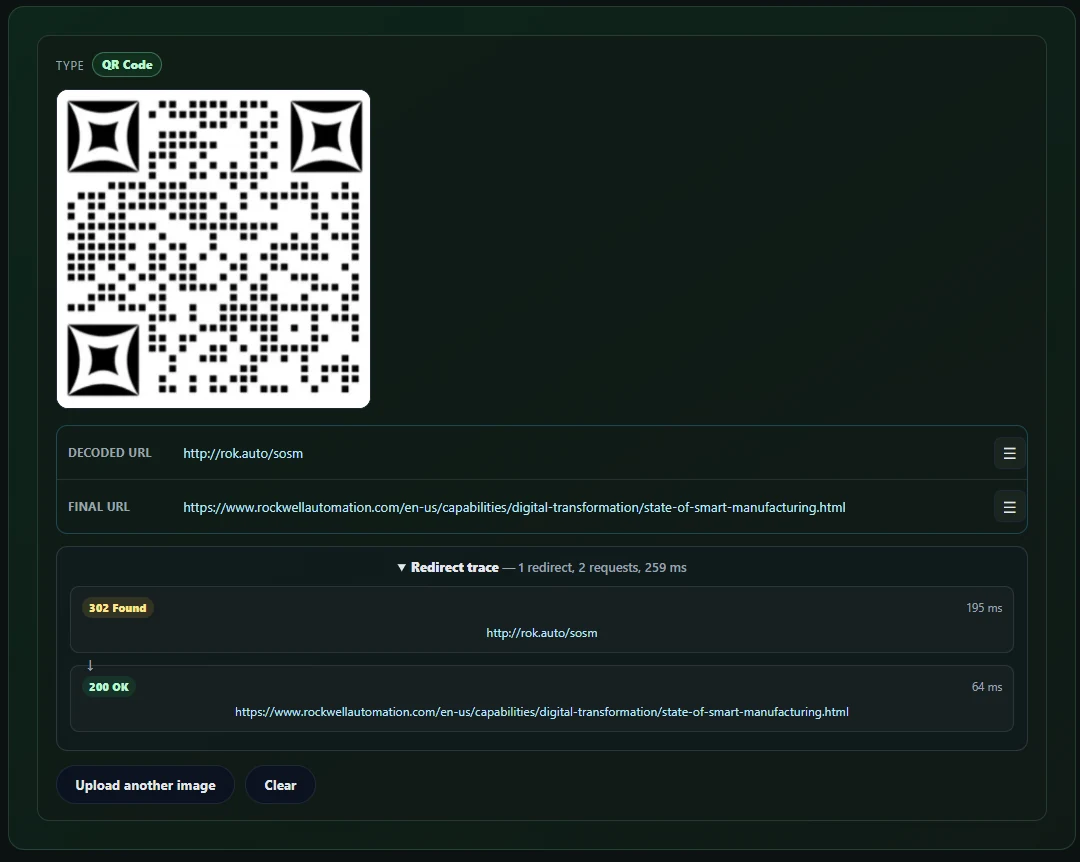
A typical scan exposes the difference between what the QR code contains and where it ultimately leads. The decoder shows both addresses and the redirect trace before the user chooses whether to open the destination.
This separation matters for dynamic codes. The QR provider may receive a request from the MonkeyTactics proxy while the redirect is being resolved, but it does not receive the scanner’s direct browser visit, cookies, full browser fingerprint, or destination-page interaction at that stage. The decoded URL itself—including any unique code identifier—is necessarily disclosed to the proxy so it can perform the lookup.
The redirect trace lets the user see whether a short link leads directly to the expected site, passes through additional tracking domains, or ends somewhere surprising. They can still decline to visit.
Make link checking optional
The URL actions menu provides separate choices to copy the decoded or final URL, open it, or check it using VirusTotal. Selecting Check Link opens VirusTotal’s analysis page for that URL; this shares the URL with VirusTotal, so it is an intentional external check rather than an invisible background request.
The decoder does not present a safety score as permission to trust a link. A clean automated result cannot prove that a page is honest, and a legitimate site can still collect data. The feature gives the user more evidence, not a guarantee.
Require confirmation before navigation
Even after inspection, selecting Open does not navigate immediately. The decoder presents a confirmation dialog explaining that the link will leave MonkeyTactics and visit another website.
That final click is the consent moment missing from the normal dynamic-QR flow. The user has seen the encoded address, the resolved destination, and any redirect chain before choosing whether their browser should contact it.
Keep the privacy claim precise
Using any web tool creates ordinary requests to load that tool. Decoding a public image URL contacts the image host from the browser. Resolving a web link sends the decoded URL to the MonkeyTactics proxy, and an optional VirusTotal check shares the URL with VirusTotal.
The decoder’s meaningful promise is narrower:
Your uploaded, pasted, or camera image is decoded locally, and no decoded destination is opened automatically in your browser.
That architecture restores something a dynamic QR code usually withholds: an informed decision before the user’s device follows the hidden link.
The simplest privacy decision is architectural
A privacy notice can explain collection. A retention setting can shorten it. An access policy can limit it. A contract can allocate responsibility.
None is as dependable as not creating the dataset.
If a campaign truly needs an editable destination or scan analytics, use a dynamic service deliberately. Document the provider, disclose the measurement before the scan when possible, minimize the fields collected, limit retention, and verify that consent and opt-out controls match the jurisdictions and audience.
If the campaign only needs to open a stable destination, use a static code.
The surprising lesson from Flock cameras is not that every database is equally dangerous. It is that small observations change character when a provider centralizes them, links them across locations, and keeps them over time.
A QR code can be just a square containing a link. It does not need to become a sensor—and scanning it does not need to mean surrendering control.
Before opening an unfamiliar code, inspect it with the MonkeyTactics QR Code & Barcode Decoder. It lets you reveal the payload, review the redirect path, and decide what happens next.
For more context, read QR Codes Explained: How They Work, What They Reveal, and How to Use Them Safely and Why Free QR Code Sites Ask for Your Email Before Delivering the QR Code.