
A QR code looks like digital static, but every square has a job. Some help a camera find the code. Others describe how to read it. The rest carry a message—often a web address—plus enough backup information to survive a smudge, scratch, or awkward camera angle.
That clever design helped QR codes move from Japanese car factories to restaurant tables, boarding passes, product packaging, payment screens, event tickets, and almost everywhere else a phone can go. It also created an easy way to hide a destination in plain sight.
Here is how QR codes got started, how they work, and what to consider before you scan or generate one.
Who invented the QR code?
The QR code was invented in Japan by a small development team led by Masahiro Hara at DENSO WAVE, then a division of automotive-parts manufacturer DENSO. The company released the code in 1994 to solve a factory-floor problem.
Traditional one-dimensional barcodes were useful, but they held little data and had to be scanned in a particular direction. Auto manufacturing needed labels that could contain more information—including Japanese characters—and could be read quickly from different angles.
Hara’s team put large square finder patterns in three corners so a reader could locate and orient the symbol almost immediately. “QR” stands for Quick Response, which describes that original goal. DENSO WAVE later made the standardized specification publicly available and waived its patent rights for standardized QR codes. That decision made the format easy for other industries and device makers to adopt.
From factory labels to everyday life
QR codes first spread through automotive manufacturing and logistics, then into inventory, retail, advertising, payments, and ticketing. Smartphones removed the need for dedicated scanners, while demand for contactless menus and check-ins accelerated public use during the COVID-19 pandemic. Today, a single familiar symbol can connect something physical—a package, poster, receipt, table, or machine—to a digital action.
Their success comes from a useful combination: QR codes are inexpensive to create, easy to print or display, readable from any direction, and capable of carrying much more than a traditional barcode.
How does a QR code work?
At the simplest level, a QR code is a grid of tiny black and white squares called modules. Think of each module as one tile in a mosaic. Together, the tiles store bits—the zeroes and ones a computer reads.
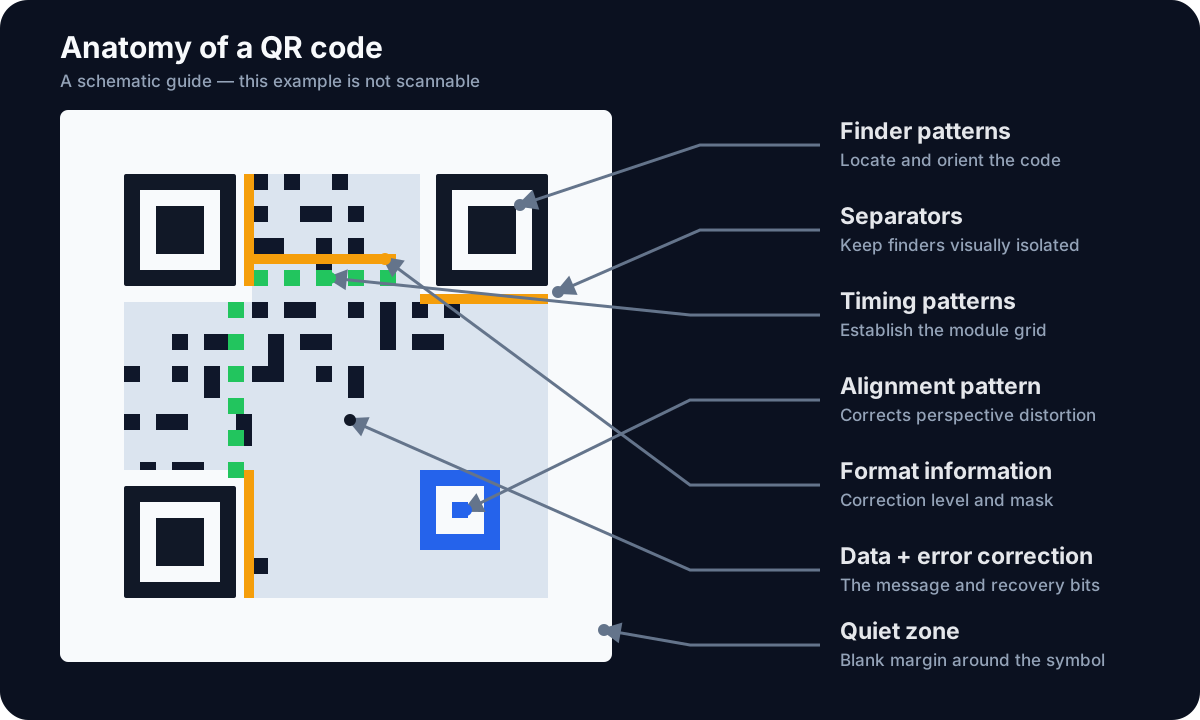
The main parts of a QR code. This illustration is a schematic, not a scannable code.
1. Your content becomes data
A generator first converts the content—such as a URL, a short note, or Wi-Fi credentials—into a stream of bits. It also records information about the encoding mode and the length of the message.
More content requires more modules. The standard defines 40 QR code versions, beginning with a 21-by-21-module grid and growing by four modules per side with each version.
2. Backup data is added
The generator calculates error-correction information using a method called Reed–Solomon error correction. You do not need to know the math to appreciate the result: the code contains enough redundancy for a scanner to reconstruct some missing or unreadable pieces.
There are four correction levels. Depending on the selected level, roughly 7% to 30% of the codewords may be recoverable under ideal conditions. Higher correction improves resilience but leaves less room for the original message. DENSO WAVE provides a fuller explanation of QR error correction.
3. The bits are arranged around a map
The data is woven around several fixed patterns:
- Finder patterns: The three large squares tell the scanner, “A QR code is here,” and reveal its orientation.
- Separators: White space immediately around the finder patterns keeps them distinct from nearby data.
- Timing patterns: Alternating modules form a ruler that helps the scanner determine the grid’s spacing.
- Alignment patterns: Smaller target-like squares help correct perspective and distortion, especially in larger codes.
- Format information: A small reserved area identifies the error-correction level and the mask used to arrange the modules.
- Data and error correction: The remaining area contains the encoded message and its recovery information.
- Quiet zone: A blank border—normally at least four modules wide—helps the reader distinguish the code from its surroundings.
A generator also applies one of several mask patterns. The mask breaks up visual patterns that might confuse a scanner, such as a large solid block or rows that resemble the finder squares.
4. A scanner reverses the process
When a camera sees the code, software finds the three large corner squares, works out the angle and size of the grid, samples each module, removes the mask, and checks the error-correction data. It then converts the surviving bits back into text.
Scanning does not automatically mean “open a website.” A QR code can contain plain text, contact details, Wi-Fi settings, or other data. The scanning app decides how to present or act on that content.
The dark side: hidden destinations and trackable scans
The most important privacy fact is this:
A printed QR code cannot report that it was scanned. A server learns about the scan when your device requests a URL encoded in the code.
If the code contains plain text and the scanner merely displays it, there may be no destination server at all. If it contains a URL and you open it, the destination receives a normal web request. That request can reveal an IP address, time, browser and device details, and a rough location inferred from the IP address. The landing page may also use cookies, analytics, or other tracking technologies.
Commercial dynamic QR code services add another layer. Instead of placing the final destination directly in the code, they encode a unique short link controlled by the QR provider. The provider logs the request and redirects the visitor to the actual page. This makes the destination editable after printing and enables scan statistics, but it also puts the provider in the middle of every visit. If the subscription ends or the provider disappears, the printed code may stop working.
There are security risks, too. Because people cannot read a QR destination by looking at the pattern, a criminal can:
- Place a malicious sticker over a legitimate code on a parking meter, sign, or menu.
- Send a code that leads to a convincing fake login or payment page.
- Hide a tracking redirect behind a trusted-looking campaign.
- Use urgency to make someone scan before checking the destination.
The Federal Trade Commission warns consumers to preview QR links, check for misspelled domains, and avoid unexpected codes that demand immediate action.
Why Monkey Tactics’ QR tools are a safer choice
The Monkey Tactics tools use a simpler privacy model than commercial platforms that upload content or route scans through tracking links.
The QR Code Generator runs in your browser. The text, URL, or Wi-Fi credentials you enter are encoded locally, and the result directly contains your chosen content. Monkey Tactics does not upload or store that input. Because the tool creates a static code rather than a vendor-controlled redirect, there is no Monkey Tactics server in the path when someone later scans it.
The QR Code Decoder also processes uploaded files, pasted screenshots, and camera frames locally in the browser. Most importantly, it displays decoded content without automatically opening a link. You can inspect the real destination before deciding whether to visit it.
That makes these tools safer for private or sensitive material, but it does not make every QR code or destination safe. Visiting the tool pages still produces ordinary web requests, and opening a decoded link exposes a request to that destination. If you decode from a public image URL, your browser must fetch that image from its host. The optional VirusTotal check also shares the decoded URL with VirusTotal. Privacy-conscious users should prefer a local image and review the decoded text before using any external check.
What the Monkey Tactics QR tools can do
Free QR Code Generator
Use the Monkey Tactics QR Code Generator to:
- Encode a website address or plain text.
- Create a Wi-Fi QR code with network name, encryption type, password, and hidden-network setting.
- Preview the code as you type.
- Download a PNG for screens, documents, and social posts.
- Download a scalable SVG for crisp signs and large-format printing.
- Generate unlimited codes without an account or daily quota.
Private QR Code Decoder
Use the Monkey Tactics QR Code Decoder to:
- Upload or drag in an image.
- Paste a screenshot directly from the clipboard.
- Decode a QR code from a public image URL when the image host permits it.
- Scan with a computer or phone camera.
- Work with browser-supported formats including PNG, JPEG, GIF, and WebP.
- Review decoded text without being sent to the destination.
- Optionally open a VirusTotal analysis page for a decoded web address.
A better habit for every scan
Treat a QR code as a concealed link, not as a seal of approval. Preview the destination, check the spelling and domain, and be especially careful when a code requests credentials, payment, an app download, or urgent action. When creating your own codes, prefer a direct static code unless you truly need an editable redirect and accept the tracking and service dependency that come with it.
QR codes are not inherently private or dangerous. They are compact containers. Their safety depends on what is inside, what the scanning app does with it, and which servers are contacted next.
QR Code is a registered trademark of DENSO WAVE INCORPORATED.