
You finish designing a QR code, click Download, and get a surprise: the site wants your email address first.
Sometimes it asks you to create an account. Sometimes it promises to “send the file” even though the QR code is already visible in your browser. Sometimes the download works, but only after you verify the address or begin a free trial.
That creates an obvious question:
Why does a free QR code site need my email to give me an image it has already generated?
The honest answer is that the email may serve several different purposes. It can identify an account, deliver a slow batch job, recover a saved campaign, enforce a plan limit, or connect a dynamic QR code to an analytics dashboard. It can also place you into a marketing and upgrade funnel.
An email request is not automatically dishonest. But it is not automatically necessary either.
This guide explains what the request usually means, how it changes the privacy and reliability of your workflow, and when a QR code generator without email or signup is the better choice.
TL;DR: A basic static QR code does not technically require your email. Sites usually ask because they are providing—or trying to sell—an account, hosted redirect, analytics, cloud storage, quota, or marketing relationship. MonkeyTactics encodes QR content locally without an email gate. Visiting the website still creates ordinary network requests, and saved projects can persist in your browser.
The QR code is free; the customer relationship may be the product
“Free QR code generator” can describe several very different businesses.
One product may be a simple static encoder: you provide text, the browser converts it into a QR grid, and you download an image. Another may be a hosted marketing platform that creates a managed redirect, stores a campaign, records scans, lets you change the destination later, and charges for advanced features.
The first product has little technical need to know who you are. The second needs a durable identity for dashboards, billing, permissions, history, and analytics.
Many confusing download gates appear because the landing page advertises the first experience—“make a free QR code”—while the business model depends on the second.
Your email bridges that gap. It lets the company turn a one-time anonymous visit into an account it can retain, contact, measure, and potentially convert into a subscription.
Seven reasons QR code generators ask for your email
1. Account identity and saved work
If a service stores QR codes on its servers, it needs a way to associate those records with the correct person or organization. An email address is a familiar account identifier and supports password resets, verification, security alerts, invitations, and ownership recovery.
This is reasonable when you explicitly want:
- A cloud dashboard
- Saved campaign history
- Team access and permissions
- Editable destinations
- Scan analytics
- Cross-device access
- API credentials or integrations
The important question is whether you asked for those services or merely wanted a static PNG.
2. Dynamic QR codes require an ongoing service
A static QR code directly contains its destination or data. Once generated, the image can continue working without contacting the generator company.
A dynamic QR code usually contains a short redirect URL controlled by the provider. When someone scans it, the provider receives the request, can record the event, and redirects the scanner to the current destination.
That makes useful features possible:
- Change the destination after printing
- Measure total scans
- Break down scans by time, device, or location
- Add campaign parameters
- Pause, expire, or organize codes
It also creates an ongoing dependency. The provider operates part of the path between the printed code and your destination, so it needs an account to manage that relationship.
Email is therefore understandable for a dynamic analytics product. It is much harder to justify as a technical requirement for downloading a simple static code.
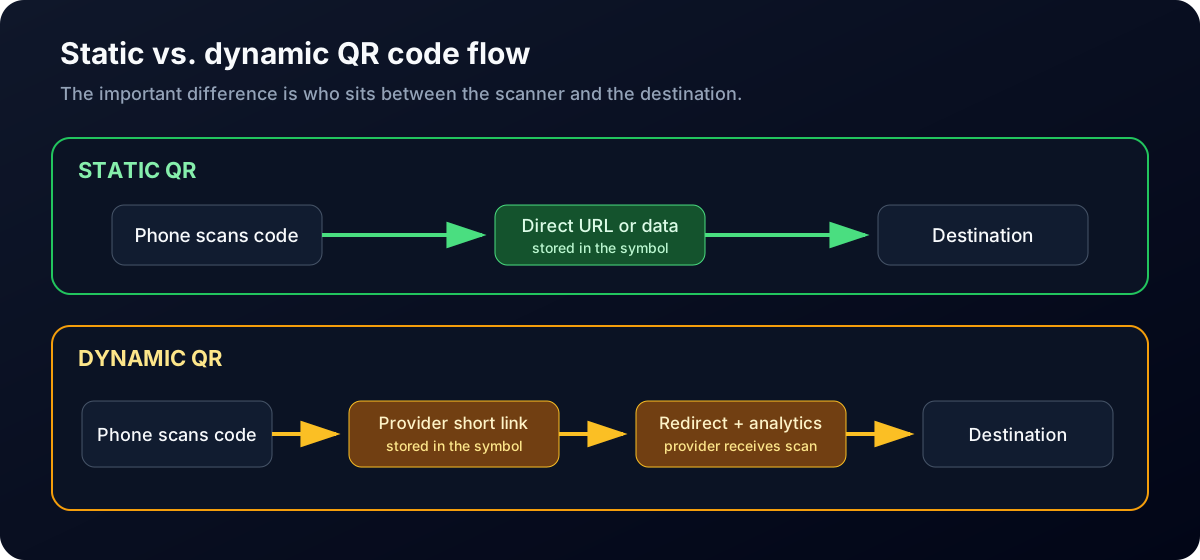
Static codes send the scanner directly to the encoded destination. Dynamic codes route the scan through the provider first.
3. Marketing-list growth
An email address gives a site a channel that survives after the browser tab closes. The company may use it for onboarding messages, feature announcements, abandoned-design reminders, newsletters, upgrade offers, or sales outreach.
That does not mean every mandatory email field adds you to every possible mailing list. Consent requirements vary by location and message type. A trustworthy interface should distinguish a necessary transactional email—such as a download notification—from optional promotional consent.
Look for unchecked marketing choices, a clear privacy notice, and an explanation of what will be sent.
4. Free-to-paid conversion
QR platforms often subsidize free creation because some users will later need analytics, editable links, custom domains, bulk generation, collaboration, or higher plan limits.
An account lets the platform:
- Show which paid features you attempted to use
- Preserve a partially configured campaign
- Measure activation and repeat use
- Apply monthly quotas
- Offer a trial at the moment of highest intent
- Contact business users about larger plans
The download gate is valuable because you have already invested time in the design. That makes it an effective conversion point—and a frustrating one when the requirement was not disclosed at the beginning.
5. Usage limits and abuse prevention
Server-side rendering, image hosting, short-link creation, analytics, and bulk jobs consume infrastructure. Anonymous automation can turn a free interface into an unofficial API.
Accounts help a service enforce:
- QR codes per month
- Batch size or upload limits
- Storage limits
- API quotas
- Download limits
- Trial eligibility
- Anti-spam and anti-abuse rules
This can be a legitimate operational requirement. It is also why a browser-local generator has a different cost structure: the user’s device performs the QR computation instead of asking a provider’s rendering server to do every job.
6. Asynchronous batch delivery
Large server-side jobs may not finish while you wait on the page. Email provides a completion notification and a link back to the results.
Bitly’s official bulk QR guide, for example, instructs users to log in, submit the file, and check email for the result; it says processing may take from minutes to hours. In that workflow, email is doing real transactional work.
That does not mean every batch generator must operate this way. A local engine can generate a bounded batch in the browser without creating a remote job or emailing a completion link.
7. Attribution and product analytics
An account helps a company understand how one person moves from ad or search result to generator, download, repeat visit, trial, and paid plan. The email address may also connect activity across devices or sessions.
This analysis can improve the product, support customers, and measure advertising. It also expands the amount of information associated with a simple QR-generation task.
The privacy tradeoff may be acceptable when the service delivers continuing value. It deserves scrutiny when identity is collected merely to release a file that could have been created locally.
The email field is only one part of the privacy question
A generator can avoid asking for email and still use cookies, analytics, advertising scripts, server logs, or uploaded QR content. Another can require an account but have clear retention controls and a strong enterprise privacy program.
Do not judge the entire privacy model from one field.
Instead, ask:
- Is the QR content uploaded? A URL may be harmless, but Wi-Fi credentials, contact data, internal links, asset identifiers, and batch files can be sensitive.
- Is the code static or dynamic? A dynamic redirect puts the provider in the scan path.
- Is an account required? If so, what continuing feature makes identity necessary?
- What is stored, and for how long? Look for project, upload, analytics, and deletion policies.
- Which third parties load on the page? Ads, analytics, support chat, and session replay can change the trust boundary.
- Will the code still work if the plan ends? A printed dynamic QR code may depend on an active provider account.
- Can you export the source and settings? Portability reduces vendor lock-in.
Privacy is not a badge. It is an architecture plus a set of specific, testable claims.
For a broader explanation of what scanners and destination servers can learn, read QR Codes Explained: How They Work, What They Reveal, and How to Use Them Safely.
Why email gating matters to businesses
For an individual making one public URL code, entering a work email may feel like a minor annoyance. For a business, the decision can affect compliance, procurement, security, and long-term operations.
Uploaded data may be business data
A batch CSV can contain product URLs, unpublished campaign pages, internal asset records, event identifiers, location data, customer-facing contact details, or device setup values. Uploading it to a vendor is a different action from processing it on an employee’s device.
That difference may trigger a security review, vendor assessment, data-processing agreement, retention requirement, or approved-software policy.
Accounts create administrative work
Business accounts need owners, recovery methods, access controls, offboarding, and sometimes payment administration. A shared personal login is difficult to audit. A former employee’s email can become a continuity problem if it owns the codes printed across a product line.
Dynamic codes create vendor dependency
Dynamic QR codes can be valuable, but the provider becomes operational infrastructure. Businesses should understand renewal costs, export options, scan limits, redirect behavior, service-level commitments, and what happens after cancellation.
The image may be printed on packaging for years. The subscription decision may have been made by one employee in an afternoon.
Marketing consent needs clear boundaries
Using an email to authenticate an account is different from using it for promotional campaigns. Businesses should know which communications are operational, which are optional marketing, and how a user can unsubscribe without breaking access to production assets.
Reproducibility matters
A professional workflow should be repeatable even if the person who created the code is unavailable. Source CSVs, project files, manifests, deterministic filenames, and direct static payloads can be easier to archive than an undocumented dashboard tied to one email.
How MonkeyTactics generates QR codes without an email
The MonkeyTactics QR Code Generator does not require an account, email address, or trial to design and export a code.
That is possible because the core product is architected differently.
The QR content is encoded in your browser
The Rust/WebAssembly engine runs on your device. The text, URL, Wi-Fi configuration, vCard, event, or other payload is passed to the local engine, which constructs the modules and produces the QR artwork.
There is no QR-generation API that needs your content sent to a MonkeyTactics server. The server delivers the page and program files; your browser performs the encoding.
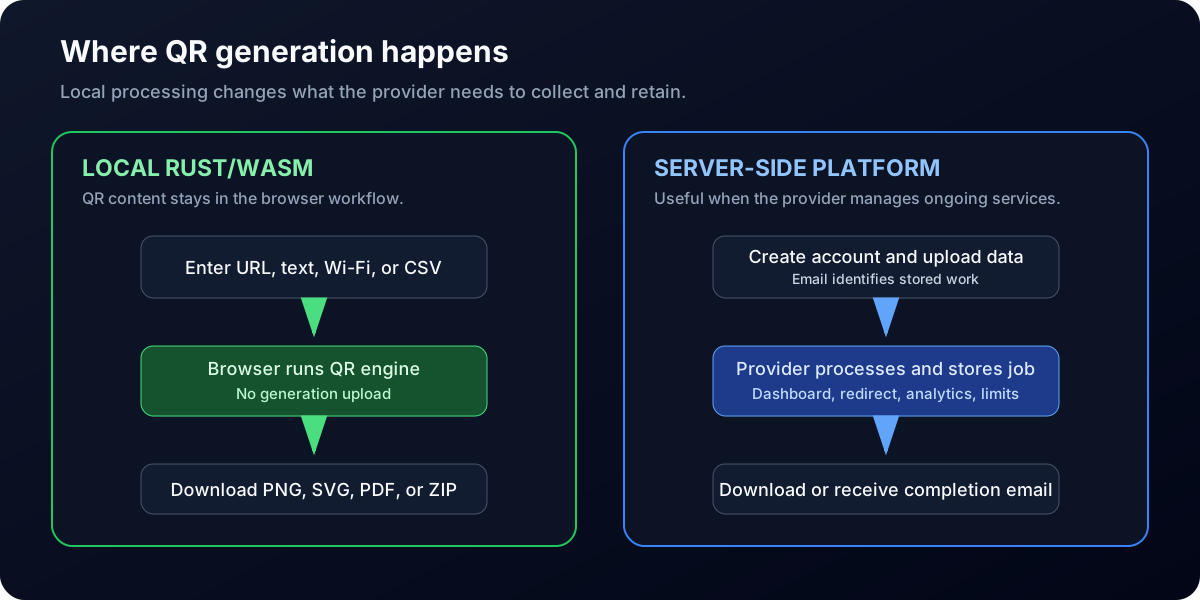
Local generation produces the files on the user’s device. A managed server workflow uploads the job so the provider can store, process, and deliver it.
Static codes do not depend on a MonkeyTactics redirect
The finished code contains the data you chose. If it contains https://example.com, the scanner reads that destination directly. MonkeyTactics does not insert a tracking short link between the QR code and the destination.
When a person opens the encoded website, that destination can still receive ordinary request information and run its own analytics. The privacy claim is about the generator not placing itself in that later scan path.
Projects and batch files use browser storage
Saved QR projects and an imported batch CSV can persist locally in browser storage so you can return to the work. They are not stored in a MonkeyTactics account because no account exists.
This is local retention, not zero retention. Anyone with access to the same browser profile may be able to access locally saved projects. Clear the project or browser storage when working on a shared device, and export a project JSON file when you need an intentional portable backup.
There is no account-based generation quota
The generator does not meter monthly QR creation against an email address or paid account. Single-code generation is available without a signup. Batch files are limited to 250 cleaned rows per export, which is a product and browser-workflow boundary—not an “unlimited batch” promise.
The batch runs locally without a remote rendering queue or emailed completion link. Learn more in Batch QR Code Workflows: CSV Validation, Reliable Styling, and Production-Ready Exports.
Reliability tools are available before download
Reliability scoring, quiet-zone inspection, ECC visualization, the risk heatmap, and perspective simulation are part of the studio rather than features unlocked after account creation.
See QR Code Reliability: Quiet Zones, ECC Levels, and Why Most Styled QRs Fail and How to Design a Beautiful QR Code Without Breaking Scanability for the technical details.
What “private” does not mean
It would be misleading to say that using any website is the same as running disconnected software.
Visiting MonkeyTactics still requires network requests to load the site. The site is served through Cloudflare, which may process IP address, device, performance, and security information. The MonkeyTactics Privacy Policy also explains the site’s advertising terms and the possible role of Google AdSense and third-party cookies.
The precise promise is:
MonkeyTactics does not require your email, and the content supplied to the QR generator is processed locally rather than uploaded as part of QR generation.
That is different from claiming that no technical data can ever be processed when you visit the website.
If the QR payload itself contains an email address—such as a mailto code or vCard—that address is encoded because you asked the tool to place it in the QR code. It is not an account-registration field or a request for MonkeyTactics to email you.
A fair comparison with account-based QR platforms
Account-based services are not inherently less trustworthy. They are often selling a different product.
Bitly
Bitly is a link-management and analytics platform. Its signup process supports email and password or third-party identity providers, while its bulk workflow uses account storage and emailed completion. That makes sense for editable links, scan analytics, campaign history, team controls, and API access.
Choose that model when those managed capabilities are the requirement. Choose a local static generator when you need the artifact, not the ongoing platform.
QRCode Monkey
Not every competing free generator requires email. The public QRCode Monkey generator allows static single-code creation and download and states that it does not save or reuse the supplied data. It promotes professional management features separately.
That is an important counterexample. A trustworthy comparison should not imply that every free QR site gates downloads or that MonkeyTactics is the only no-email static generator.
MonkeyTactics differentiates itself through the combination of no-account local generation, batch validation and packaging, advanced styling, project portability, and visible reliability diagnostics.
QR TIGER
QR TIGER offers static and dynamic QR products, bulk generation, customization, tracking, and managed dashboards. Its account and enterprise workflows use email identity because users are managing stored codes and ongoing services.
Again, the tradeoff depends on the job. Tracking and editable destinations justify an account in ways that a one-time static export does not.
Static, local, and account-based workflows at a glance
| Workflow question | Local static generator | Download-only static site | Account-based dynamic platform |
|---|---|---|---|
| Email technically required? | No | No; site policy varies | Usually, for stored services |
| What the QR contains | Direct URL or data | Direct URL or data | Provider-controlled short link |
| Where generation happens | User's browser/device | Browser or provider server | Provider infrastructure |
| Editable after printing | No | No | Yes, while service remains available |
| Built-in scan analytics | No | Usually no | Yes |
| Provider in the scan path | No | No for a direct static code | Yes |
| Primary dependency | Encoded destination | Encoded destination | Provider redirect and destination |
The categories can overlap: a site may create static codes on its server, and an account platform may also offer untracked static exports. The table summarizes the typical architecture, not a rule that applies to every product or plan.
When providing your email is reasonable
An email request can be appropriate when it is proportional to the service and disclosed before you invest significant work.
It may be worth providing when you need:
- A dynamic QR destination you can edit later
- Scan analytics and campaign reporting
- Cloud-saved history across devices
- Team collaboration and permissions
- An API or automation credentials
- Recovery for valuable hosted assets
- Completion notification for a genuine asynchronous job
- Billing, receipts, or enterprise support
Before creating the account, check the plan limits, data-retention policy, marketing-consent controls, export options, cancellation behavior, and whether printed codes keep working after the subscription ends.
Warning signs at the download step
Pause before entering an email when:
- The requirement appeared only after you finished the design.
- The site does not explain whether the code is static or dynamic.
- “Free” actually begins a time-limited trial requiring payment details.
- Marketing consent is bundled into account creation without a clear choice.
- The privacy policy does not explain uploaded QR content or batch files.
- The provider will not say what happens when the plan expires.
- The displayed QR contains a provider redirect when you expected your direct URL.
- You cannot export or delete the saved project.
None of these proves malicious intent. Together, they indicate a workflow whose business terms deserve closer inspection.
Frequently asked questions about email-gated QR tools
Why does a QR code generator need my email?
It may use the email for account identity, cloud storage, dynamic redirects, analytics, plan limits, batch-job delivery, security, or marketing. A basic static QR download can be generated without email when the tool does not need those ongoing services.
Can I create a QR code without signing up?
Yes. A static free QR code generator with no signup can encode the content directly and download an image without creating an account. Confirm that the final code contains your direct destination rather than a provider-controlled redirect.
Is a no-email QR code generator anonymous?
Not necessarily. The absence of an email field does not prevent ordinary server logs, CDN processing, cookies, ads, or analytics. Read the privacy policy and distinguish local QR-content processing from broader website telemetry.
Are free QR codes permanent?
A static QR image does not inherently expire. It works while the encoded destination or data remains valid. A dynamic code can depend on the provider’s redirect service, account status, plan, or policies.
Does MonkeyTactics store my QR code data?
QR content is processed locally for generation. If you save a project or import a batch, that information can persist in local browser storage. MonkeyTactics does not require an account or upload the QR payload to a generation backend.
Does MonkeyTactics track scans?
No MonkeyTactics redirect is inserted into generated static codes, so MonkeyTactics is not in the scan path. The destination encoded in the QR code may collect its own request data or analytics when someone opens it.
Transparency matters more than the word “free”
An email address is not a monetary payment, but it is still valuable. It creates an identity, a communication channel, a retention record, and a path toward a subscription.
That exchange can be worthwhile when you need a managed analytics platform. It should not be hidden behind the final Download button.
MonkeyTactics takes a simpler approach for static QR production: no forced signup, no email gate, local Rust/WASM generation, direct payloads, portable exports, and reliability tools available before download.
Create and download a QR code without providing your email.
The tool is free to use, single-code generation is not tied to an account quota, and each batch can contain up to 250 cleaned rows.
QR Code is a registered trademark of DENSO WAVE INCORPORATED.